> ## Documentation Index
> Fetch the complete documentation index at: https://manual.muzemus.online/llms.txt
> Use this file to discover all available pages before exploring further.
# Sales Order documents
> How Sales Order PDFs are generated, accessed, and distributed.
A Sales Order is the formal document generated for each store order batch submission. It records what was ordered and serves as the official order record.
The Sales Order is an order record, not an invoice. It does not contain payment terms, banking details, VAT, or amount-due information.
## When a Sales Order is generated
A Sales Order PDF is generated automatically every time a store order batch is submitted, whether the order comes from a Store Manager, HR, or an Administrator.
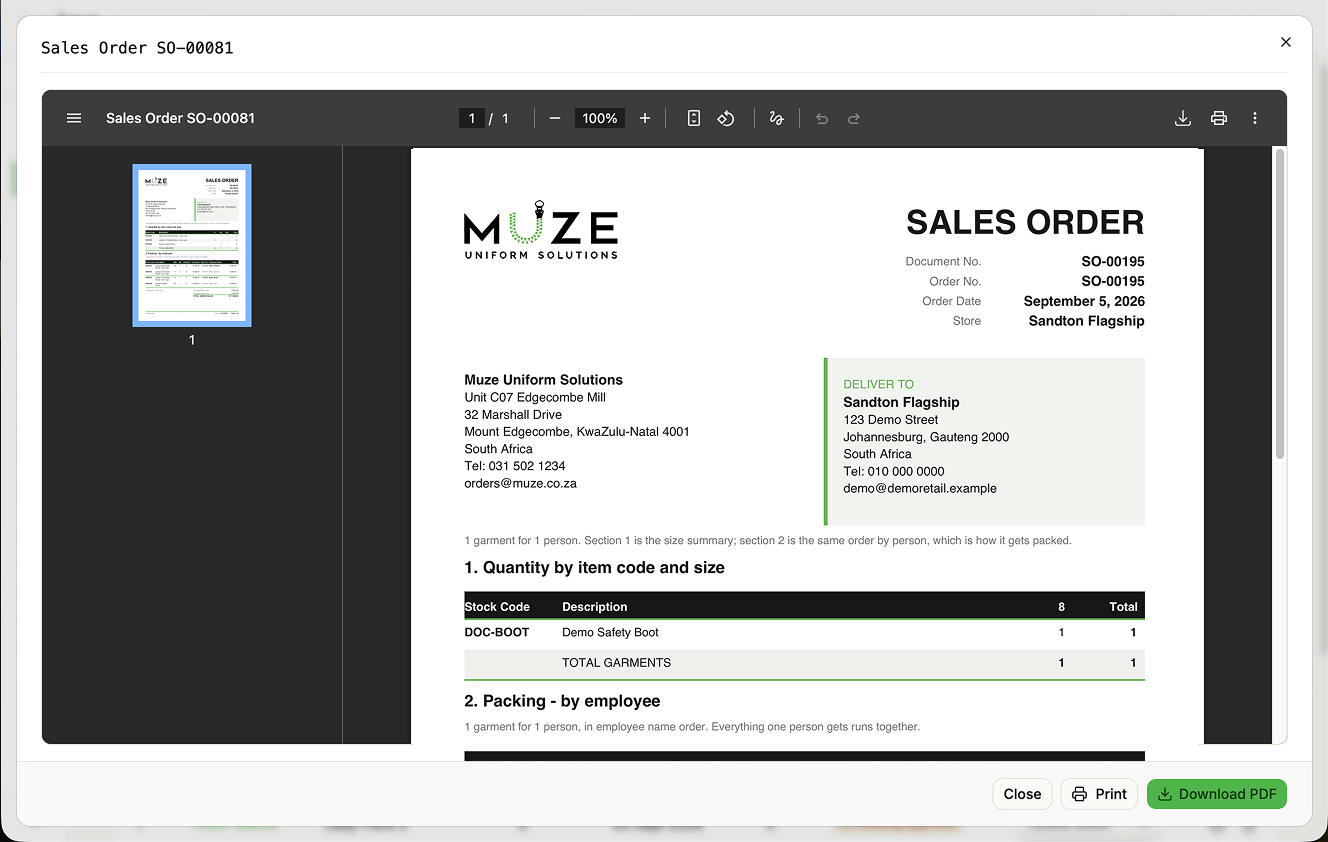 ## Document contents
**Header.** MUZE organisation details, document number (`SO-XXXXX`), date, and the store's delivery address.
**Section 1: Quantity by item code and size.** A product matrix with stock codes, descriptions, size columns with quantities, row and column totals, and a total garments footer.
**Section 2: Packing by employee.** A detailed packing list with stock code, description, size, quantity, payment type, unit value, and employee name and number. Employee blocks are kept together across page breaks.
**Totals.** Company-paid portion, employee-paid portion, and total order value.
**Footer.** Store name, order number, and page numbers.
## Accessing Sales Orders
From the Orders page:
1. Find the store order batch (`SO-#####`).
2. Click the **Sales Order** action to:
* **Preview** in a fullscreen dialog
* **Download** the PDF
* **Print** the document
## Email distribution
When a batch is submitted, the Sales Order PDF is attached automatically to the approval email to HR and the informational copy to Administrators. Delivery is best-effort; if it fails, the order is still submitted successfully. See [Notifications](/orders/notifications).
## Related topics
- [Managing orders](/administrator/managing-orders.md)
- [Viewing store orders](/store-manager/viewing-orders.md)
- [Viewing orders (HR)](/hr/viewing-orders.md)
- [System settings](/administrator/system-settings.md)
- [Approving orders (HR)](/hr/approving-orders.md)
## Document contents
**Header.** MUZE organisation details, document number (`SO-XXXXX`), date, and the store's delivery address.
**Section 1: Quantity by item code and size.** A product matrix with stock codes, descriptions, size columns with quantities, row and column totals, and a total garments footer.
**Section 2: Packing by employee.** A detailed packing list with stock code, description, size, quantity, payment type, unit value, and employee name and number. Employee blocks are kept together across page breaks.
**Totals.** Company-paid portion, employee-paid portion, and total order value.
**Footer.** Store name, order number, and page numbers.
## Accessing Sales Orders
From the Orders page:
1. Find the store order batch (`SO-#####`).
2. Click the **Sales Order** action to:
* **Preview** in a fullscreen dialog
* **Download** the PDF
* **Print** the document
## Email distribution
When a batch is submitted, the Sales Order PDF is attached automatically to the approval email to HR and the informational copy to Administrators. Delivery is best-effort; if it fails, the order is still submitted successfully. See [Notifications](/orders/notifications).
## Related topics
- [Managing orders](/administrator/managing-orders.md)
- [Viewing store orders](/store-manager/viewing-orders.md)
- [Viewing orders (HR)](/hr/viewing-orders.md)
- [System settings](/administrator/system-settings.md)
- [Approving orders (HR)](/hr/approving-orders.md)