> ## Documentation Index
> Fetch the complete documentation index at: https://manual.muzemus.online/llms.txt
> Use this file to discover all available pages before exploring further.
# Reports overview
> The reports available in MUZE and who can access them.
MUZE provides three reports for monitoring uniform programme performance, spending, and replacement needs.
Navigate to **Reports** from the sidebar. Access depends on your role.
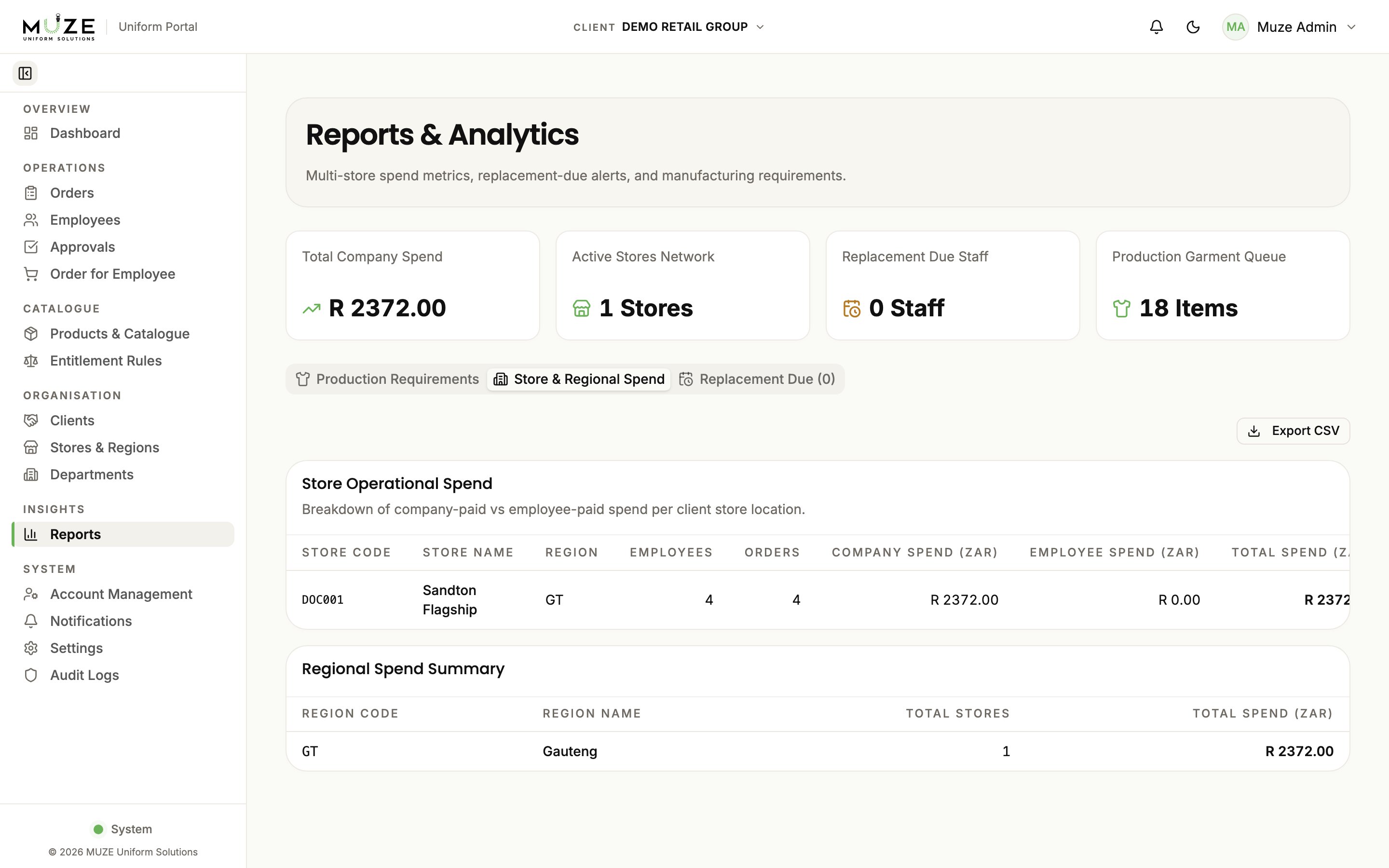 ## Summary cards
The top of the Reports page shows overview cards:
* **Total Company Spend**: aggregate spending in Rands
* **Active Stores Network**: number of active stores
* **Replacement Due Staff**: employees eligible for replacement
* **Production Garment Queue**: items in active production
## Store & Regional Spend report
Per-store breakdowns of uniform spending.
| Column | Description |
| ------------------ | ------------------------------ |
| **Store** | Store name |
| **Employees** | Number of employees |
| **Orders** | Total order count |
| **Company Spend** | Total company-paid amount (R) |
| **Employee Spend** | Total employee-paid amount (R) |
| **Total Spend** | Combined total (R) |
A **regional summary** aggregates spend across the stores in each region.
**Available to:** Administrators (org-wide) and HR (client-scoped).
## Replacement Due report
Employees whose replacement cycle date has been reached and who are eligible for new allocations.
| Column | Description |
| ------------------------- | ---------------------------- |
| **Employee** | Name and number |
| **Store** | Assigned store |
| **Uniform Category** | Employee's category |
| **Rule Set** | Matched entitlement rule set |
| **Employment Start Date** | When the employee started |
| **Replacement Due Date** | When replacement is due |
**Available to:** Administrators, HR, and Store Managers (store-scoped).
## Production Requirements report
Manufacturing requirements drawn from active production orders:
* **Garment Manufacturing Requirements**: aggregated product and size quantities from orders in Approved through Quality Check
* **Monthly Production Outlook**: a 12-month trailing view of orders by submission month, filterable by month
**Available to:** Administrators only.
## Exporting
The Spend and Replacement Due reports export as CSV with the **Export** button on the relevant tab.
## Related topics
- [Reports (HR)](/hr/reports.md)
- [HR overview](/hr/overview.md)
- [Store Manager overview](/store-manager/overview.md)
- [Navigation](/getting-started/navigation.md)
- [Store overview](/store-manager/store-overview.md)
## Summary cards
The top of the Reports page shows overview cards:
* **Total Company Spend**: aggregate spending in Rands
* **Active Stores Network**: number of active stores
* **Replacement Due Staff**: employees eligible for replacement
* **Production Garment Queue**: items in active production
## Store & Regional Spend report
Per-store breakdowns of uniform spending.
| Column | Description |
| ------------------ | ------------------------------ |
| **Store** | Store name |
| **Employees** | Number of employees |
| **Orders** | Total order count |
| **Company Spend** | Total company-paid amount (R) |
| **Employee Spend** | Total employee-paid amount (R) |
| **Total Spend** | Combined total (R) |
A **regional summary** aggregates spend across the stores in each region.
**Available to:** Administrators (org-wide) and HR (client-scoped).
## Replacement Due report
Employees whose replacement cycle date has been reached and who are eligible for new allocations.
| Column | Description |
| ------------------------- | ---------------------------- |
| **Employee** | Name and number |
| **Store** | Assigned store |
| **Uniform Category** | Employee's category |
| **Rule Set** | Matched entitlement rule set |
| **Employment Start Date** | When the employee started |
| **Replacement Due Date** | When replacement is due |
**Available to:** Administrators, HR, and Store Managers (store-scoped).
## Production Requirements report
Manufacturing requirements drawn from active production orders:
* **Garment Manufacturing Requirements**: aggregated product and size quantities from orders in Approved through Quality Check
* **Monthly Production Outlook**: a 12-month trailing view of orders by submission month, filterable by month
**Available to:** Administrators only.
## Exporting
The Spend and Replacement Due reports export as CSV with the **Export** button on the relevant tab.
## Related topics
- [Reports (HR)](/hr/reports.md)
- [HR overview](/hr/overview.md)
- [Store Manager overview](/store-manager/overview.md)
- [Navigation](/getting-started/navigation.md)
- [Store overview](/store-manager/store-overview.md)