

The Sales Order is an order record, not an invoice. It does not contain payment terms, banking details, VAT, or amount-due information.
When a Sales Order is generated
A Sales Order PDF is generated automatically every time a store order batch is submitted, whether the order comes from a Store Manager, HR, or an Administrator.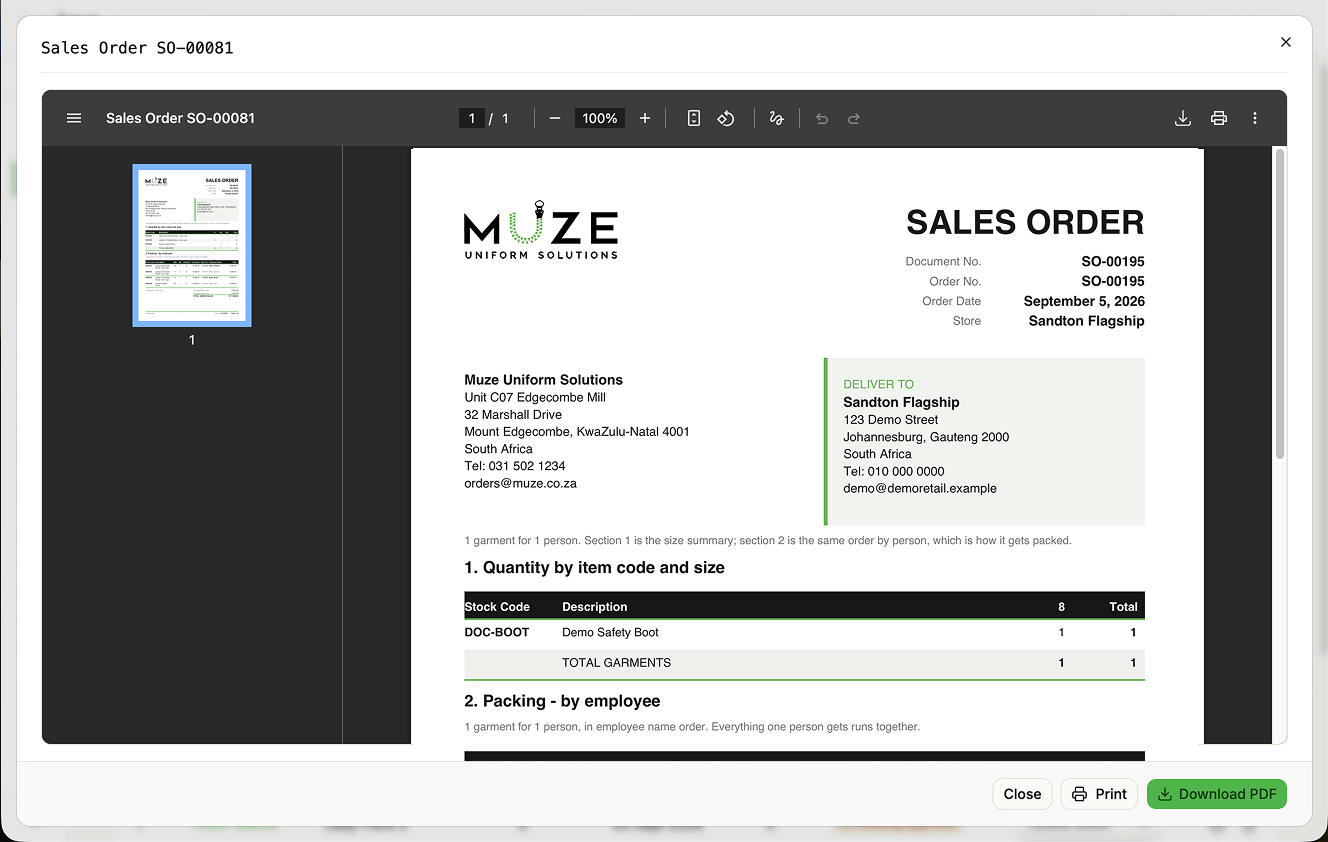
Document contents
Header. MUZE organisation details, document number (SO-XXXXX), date, and the store’s delivery address.
Section 1: Quantity by item code and size. A product matrix with stock codes, descriptions, size columns with quantities, row and column totals, and a total garments footer.
Section 2: Packing by employee. A detailed packing list with stock code, description, size, quantity, payment type, unit value, and employee name and number. Employee blocks are kept together across page breaks.
Totals. Company-paid portion, employee-paid portion, and total order value.
Footer. Store name, order number, and page numbers.
Accessing Sales Orders
From the Orders page:- Find the store order batch (
SO-#####). - Click the Sales Order action to:
- Preview in a fullscreen dialog
- Download the PDF
- Print the document